Mungo Says Bah - Canadian Bushcraft, Camping, Outdoors & Hiking - Skills, Equipment & Tutorials

Thursday, September 07, 2006

How to delete all cookies in Firefox on closing, EXCEPT for those from selected domains!

*Note this has been updated for Firefox 2.0 here - June 4, 2007:

How To Delete Cookies in Firefox Except from Particular Sites like Google - Exceptions in Privacy Control

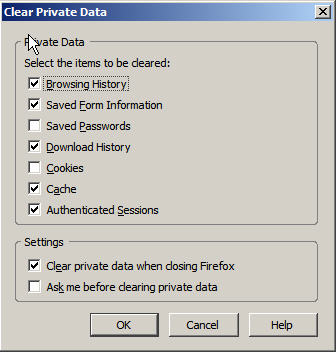
Using the Firefox ‘Clear Private Data tool’, I set my privacy settings on my Firefox to clear the following when closing:

  • browsing history
  • saved form information
  • download history
  • cache
  • authenticated sessions


Trouble is, when I needed to log into Gmail, maintain my Google search preferences, keep my Digg login active, New York Times login, my Blogger login – you name it, I had to re-submit my credentials each time.

Now, Firefox doesn’t seem to have a ‘Delete all cookies except the following’ feature under a fancy button entitled ‘Delete all cookies except the following feature’. But here is the way to do it without installing any add-ins or extensions

Select the Options feature from the Tools option in the File Menu:


Under the Privacy region, select the Cookies tab.


Select ‘Allow sites to set cookies’, make sure the 2 checkboxes beneath that are un-checked (‘for the originating site only’ & unless I have removed cookies set by the site’), ensure the drop-down option box for the item ‘Keep Cookies’ equals ‘until I close Firefox’.

Now, here’s the good part. The Exceptions button beside the ‘Allow sites to set Cookies’ option contains the important elements.
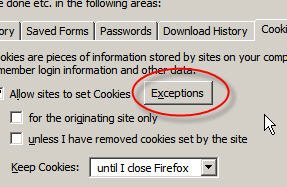


I have added several domains for which I wish to have the cookies retained on my system, and you will see how I am adding ‘digg.com’ to my list. Choose ‘Allow’ to add this domain to your list, and then click ‘Close’. Then click ‘Okay’ on your Options window, and then exit out of Firefox.


Once you open it again, you will be able to visit the sites for which you have allowed cookies to be retained and you won’t need to log in again - i.e. the cookies remain, while all others are deleted.

This will save me much annoyance - and I hope it saves you much annoyance too.

You can go home with Mungo now.

23 comments:

Ben L. said...

Excellent! It seemed easy enough, but I didn't think about it ever. It is alot better now, thank you Mungo! :)

Anonymous said...

thank you.

arlette@igc.org said...

In your example, you do not have cookies checked in the privacy settings dialog. Have you done as you say with the cookies checked, and still not lost cookies in that are in the exceptions domain?

Grunt said...

Does it save these 'Exceptions' in your firefox profile?
Cos that'd be good when backing up my profile directory before i format my comp.

(By profile, i mean the directory:

C:\Documents and Settings\USER\Application Data\Mozilla\Firefox\Profiles\xxxxxx.default\

Kelson said...

I use the same technique described here, and I can answer a couple of these questions:

No, "Clear Private Data" will not honor the exceptions. It will remove all cookies if you tell it to include cookies. So for this to work, you have to tell CPD not to delete cookies, and let your cookie settings take care of it.

Yes, the list of exceptions is stored in your profile.

Desco said...

I absolutely love this! This is how I've always used Opera, but setting Firefox to "Keep cookies until I close Firefox" never payed attention to the Exceptions list. I'm glad the "Clear Private Data" tool does.

On a side note, in Firefox 2.0b2, the "keep cookies until I close Firefox" option DOES pay attention to the Exceptions.

Viva Firefox+NoScript+AdBlockPlus!

Anonymous said...

How might one selectively delete cookies for a particular site? Essentially the opposite of this, save all cookies EXCEPT for one particular site?

Sue said...

I hate to be old. I am not techie enough but your suggestion is great. When you tell us to input the sites we want excepted, do you mean every url of every site? Or is there is easier way to do multiple at a time?

Thank you.

Anonymous said...

Would anyone know how to do that on a Mac version of Firefox?

Aaron said...

I think a better solution is to not accept cookies you don't want in the first place. I just set Firefox to ask me and I only accept cookies from the sites I want to. It is a little annoying at first but after a short period it knows your preferences for the sites you regularly visit.

Ray said...

This is a great find. Very nice and simple instructions.

Speedmaster said...

Very helpful, thanks!

Daniel E said...

The Permit Cookies plugin is a nice complement to this setup. I've been running this way since Firebird .7. Whenever I decide to start accepting a website's cookies, I just hit Alt-C and set it to allow.

Standard Mischief said...

I've been doing essentially the exact same thing for a while. I posted a howto on it, but I've not gotten any feedback on if this method works with Firefox on a Mac. I know it works both on Linux and MS Windows.

http://standardmischief.com/2006/01/20/google-can-and-should-do-better/

First I talk briefly about Google's cookie, and their lack of a data retention policy.

Then I show how to zero out the cookie that Google sends you, so that it makes it harder for Google to segregate out your search request from mine. (thanks iMilly)

Finally, I show how to use the Firefox extension CookieCuller to save that special Google cookie, and any other cookie you might find useful, and then “upchuck” all of the remaining ones after a session.

Anonymous said...

If you already "carry" a lot of cookies, adding them to exceptions one-by-one can get tedious because wwhen you're in the exceptions dialogue you can't see the ones you're carrying. You can at least edit cookies.txt from your profile (you'll be amazed), save it under a different name, and have the new text file visible when you're adding exceptions. Too bad you can't just paste in the whole list (bah!) but at least it's visible.

jokoon said...

Nice to know when even with adblock etc, I have a lot of cookies with "ad" in the domain. I just listed the domain I want cookies to be kept, there are 26 entries. Some time wasted again, but i'll do it >:-)

foxtrott said...

A good explanation Mungo - thank you.

TecNut said...

YES.. It works..

Thanks for sharing the info.

TecNut said...

YES.. it works..

Thanks for sharing this info.

Anonymous said...

Finally, this was what i was looking for. Thanks man. Those cookie options needs some work from the mozilla team

jubjub said...

thanks, i've been wanting to do this for about a year; only took the time to google it today. i owe you 10 seconds out of every day!

Richard Rees said...

Thanks for sharing this info.

Siju said...

Selectivecookiedelete addon gives you control based on hosts as to which cookie to keep and which cookie to be removed based on pre-set preference.

https://addons.mozilla.org/en-US/firefox/addon/11044

Read Newer Post Read Older Post Mungo Says Home